
Kingston IronKey Vault Privacy 50
4.5Editor score
256GB High Capacity Storage
Brute Force and BadUSB Protection
TAA Compliant for Government
This guide compares the top encrypted USB flash drives based on security certifications, hardware encryption, and durability to help you choose the right
Protecting sensitive data is more critical than ever. An encrypted USB flash drive ensures your files remain secure even if the device is lost or stolen. Look for hardware-based encryption and strong authentication methods.
We evaluated ten leading models based on security standards, build quality, and usability. Our analysis focuses on FIPS validation, encryption algorithms, and real-world performance. This list covers options for various needs and budgets.
Each pick highlights key strengths and potential trade-offs. We include detailed reviews and a buying guide to simplify your decision. Note that product availability and pricing may change over time.
4.5Editor score
4.6Editor score

4.1Editor score
This table provides a side-by-side comparison of all ten selected encrypted USB flash drives. Review the key specifications and certifications to find the model that best fits your security requirements.


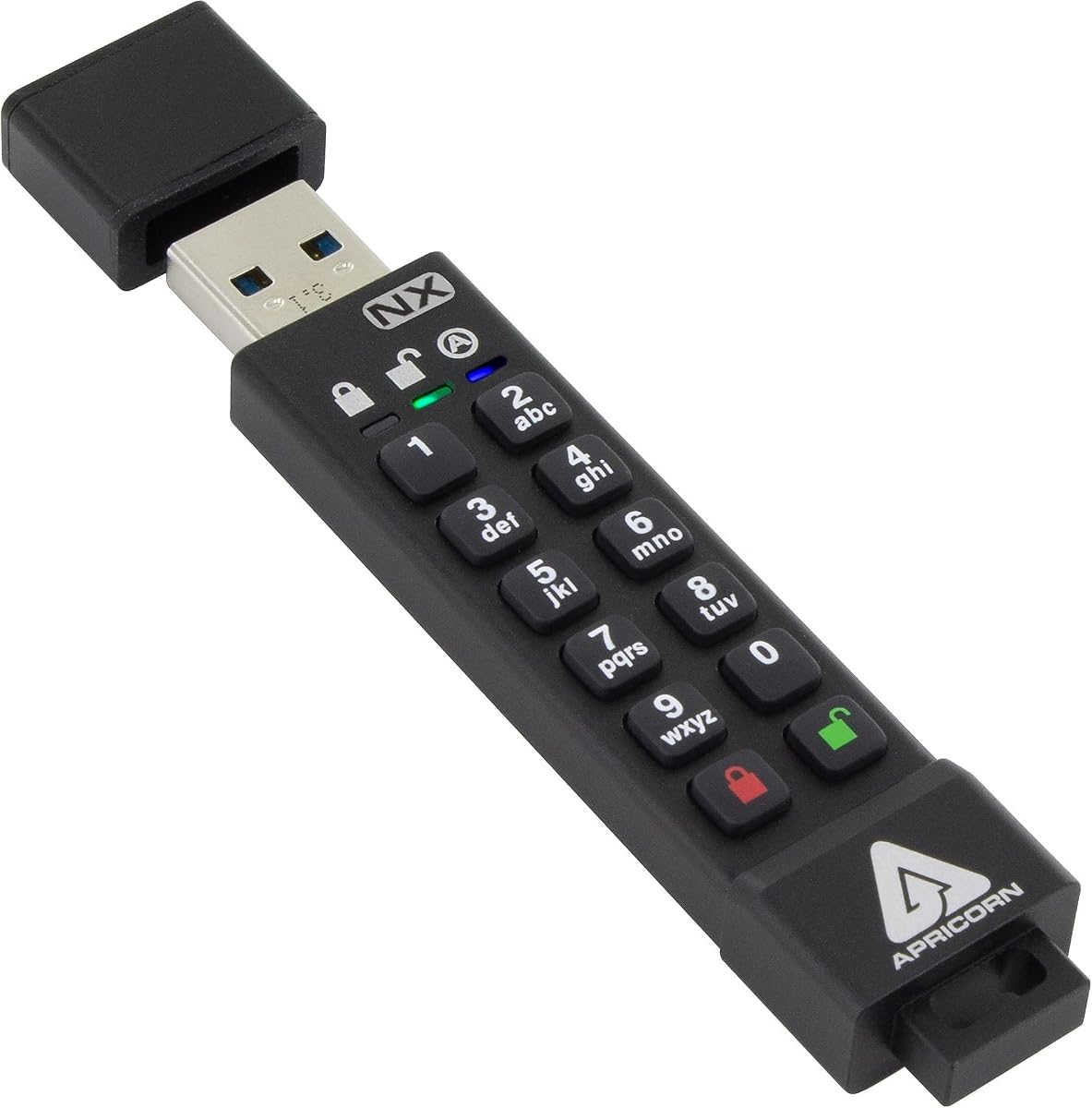
The Apricorn Aegis Secure Key 3 NX stands out as a top choice for users requiring maximum data protection. It holds a FIPS 140-2 Level 3 validation which is a rigorous standard for cryptographic modules. This drive ensures that your sensitive information remains secure against unauthorized access attempts.
We may earn a commission when you buy through this link, at no additional cost to you.
Its hardware-based encryption uses 256-bit AES technology to protect data at rest. The drive offers separate admin and user modes allowing for distinct access levels and control. Data recovery PINs are available to prevent total data loss if a password is forgotten.
While the device offers exceptional security it comes at a higher cost compared to standard drives. The 8GB capacity may be limited for users needing to store large media files. These trade-offs are acceptable for those prioritizing security over storage space.
This drive is ideal for government contractors, security professionals, and anyone handling regulated data. It provides a reliable way to transport confidential files without compromising on safety standards. For top-tier protection this model is highly recommended.
The FIPS 140-2 Level 3 certification ensures the drive meets strict federal security requirements. This makes it suitable for use in environments with high security clearance levels.
The Aegis Configurator allows administrators to set specific security policies. This includes setting read-only modes and enabling data recovery mechanisms for better control.
We may earn a commission when you buy through this link, at no additional cost to you.
The Kingston IronKey Vault Privacy 50 combines robust security with high storage capacity. It features 256GB of space making it suitable for storing large datasets or media files securely. The drive uses 256-bit AES encryption to safeguard all data stored on it.
We may earn a commission when you buy through this link, at no additional cost to you.
It includes protection against brute force and BadUSB attacks with digitally-signed firmware. This ensures that malicious software cannot compromise the drive's security system. Users can also enable read-only settings to prevent accidental data modifications.
The drive is TAA compliant which is a requirement for many government procurement standards. This adds value for public sector users needing to meet specific trade agreements. The price is higher but justified by the capacity and advanced protections.
This model is perfect for enterprise users or individuals with significant storage needs. It balances convenience and security effectively. If you need to store large amounts of sensitive data this drive is an excellent choice.
The drive digitally signs its firmware to prevent tampering. This feature defends against BadUSB attacks where a malicious device impersonates a keyboard.
Passphrase modes allow users to create longer and more memorable passwords. This improves usability without sacrificing the strength of the encryption.
We may earn a commission when you buy through this link, at no additional cost to you.
The Integral Crypto-197 offers reliable encryption at a budget-friendly price. It holds a FIPS 197 certification which ensures it meets high security standards. This drive is a practical choice for users who need basic protection without breaking the bank.
We may earn a commission when you buy through this link, at no additional cost to you.
Its waterproof double layer design protects the electronics from damage during transport. The auto-lock feature secures data when the drive is removed from a computer. There is no software required to operate the drive making it easy to use.
The 4GB capacity is sufficient for documents and small files but not for large media. While the storage is limited the security features remain robust. The price makes it accessible for personal or small business use.
This drive is ideal for students or travelers needing to transport important documents. It provides peace of mind with its certified security. If you need a cost-effective secure drive this is a strong contender.
The double layer design includes a hardened internal case and rubberized outer shell. This protects the drive from water and physical impacts.
The secure entry feature requires an alphanumeric password to access data. Password hints are available but cannot match the actual password.
We may earn a commission when you buy through this link, at no additional cost to you.
The Apricorn Aegis Secure Key 3 NXC is designed for devices with USB-C ports. It offers 128GB of storage making it suitable for larger datasets. The drive maintains the same high security standards as the standard NX model.
We may earn a commission when you buy through this link, at no additional cost to you.
It uses 256-bit hardware encryption and is FIPS 140-2 Level 3 validated. This ensures that the data is protected against unauthorized access. The drive does not require any software installation to function.
The internal battery provides power for the authentication system independently. This adds a layer of reliability and security. The Type-C connector ensures compatibility with newer laptops and mobile devices.
This drive is best for users working with modern hardware who need secure storage. It combines high capacity with top-tier encryption. If you need a USB-C drive with robust security this is a great option.
The USB 3.2 Type-C connector ensures fast data transfer speeds. It works with a wide range of modern devices.
The FIPS 140-2 Level 3 validation ensures the highest level of security. This is essential for sensitive government or corporate data.
We may earn a commission when you buy through this link, at no additional cost to you.
The iStorage datAshur PRO is designed to withstand harsh environments. It features an IP57 rating which means it is dust and water resistant. This makes it ideal for outdoor use or industrial settings.
We may earn a commission when you buy through this link, at no additional cost to you.
Security is handled via a hardware PIN which eliminates the need for software. The drive uses AES-XTS 256-bit encryption to protect data. It is compatible with Windows, macOS, and Linux systems.
The 4GB capacity is modest but sufficient for documents. The transfer speeds are fast thanks to USB 3.2 technology. The drive is certified for government use with FIPS 140-2 Level 3.
This model is perfect for field workers or military personnel. It ensures data is safe even in tough conditions. If you need a durable secure drive this is a strong choice.
The IP57 rating ensures the drive can withstand immersion and dust. This is rare for USB drives in this category.
The drive works on any device with a USB port. No drivers or software are required for operation.
We may earn a commission when you buy through this link, at no additional cost to you.
This drive offers a balance of capacity and security at a reasonable price. It uses a dedicated chip for AES256-bit encryption. This ensures that data is protected at the hardware level.
We may earn a commission when you buy through this link, at no additional cost to you.
The aluminum alloy shell provides a durable and sleek design. Automatic lock features engage when the drive is disconnected or inactive. This prevents unauthorized access if the drive is left behind.
The 64GB capacity is suitable for backups and media files. However it uses the FAT32 file system which limits individual file sizes. The wipe function adds security by erasing data after errors.
This model is a good choice for users needing medium capacity. It offers solid protection without a high price tag. If you need a reliable 64GB secure drive this fits well.
The drive locks automatically when removed from a computer. This ensures data is never left unlocked and accessible.
Inputting the wrong password ten times will wipe all data. This protects sensitive information from brute force attacks.
We may earn a commission when you buy through this link, at no additional cost to you.
The Lexar JumpDrive F35 PRO uses biometric technology for access. It can save up to 10 fingerprints allowing multiple users. This provides a convenient way to access data without typing passwords.
We may earn a commission when you buy through this link, at no additional cost to you.
It offers fast read speeds up to 400MB/s. This is ideal for working with large video or image files. The drive also includes 256-bit AES encryption for data protection.
The recognition time is less than one second making it quick. However the drive relies solely on the fingerprint sensor. If the sensor fails you may have limited recovery options.
This drive is suitable for tech-savvy users who want fast access. It combines speed with security effectively. If you prefer fingerprint access over PINs this is a strong option.
The 400MB/s read speed allows for quick file access. This is significantly faster than standard USB drives.
Fingerprint access removes the need to remember passwords. This simplifies the process for frequent users.
We may earn a commission when you buy through this link, at no additional cost to you.
The iStorage datAshur PRO2 improves on the previous model with higher durability. It has an IP68 rating which offers superior protection against dust and water. This makes it one of the most rugged options available.
We may earn a commission when you buy through this link, at no additional cost to you.
It uses a hardware PIN for authentication which is secure and easy. The drive is FIPS 140-2 Level 3 certified for high security. It works with any USB port without drivers.
The 32GB capacity is suitable for business files. The transfer speeds are fast ensuring efficient workflow. This drive is built to survive extreme environments.
This model is perfect for industrial or military applications. It ensures data integrity even in harsh conditions. If you need the most durable drive this is the top choice.
The IP68 rating means the drive can be submerged in water. This is the highest standard for consumer electronics.
The FIPS 140-2 Level 3 certification ensures regulatory compliance. This is essential for government or legal data handling.
We may earn a commission when you buy through this link, at no additional cost to you.
The Kingston Ironkey D500S introduces a dual hidden partition feature. This allows you to separate public and private data. It uses FIPS 140-3 Level 3 certification for top-tier security.
We may earn a commission when you buy through this link, at no additional cost to you.
The zinc casing provides excellent protection against physical damage. BadUSB protection ensures the drive is safe from malicious software. Multi-pin options allow for flexible user management.
The 16GB capacity is limited but sufficient for documents. The price reflects the advanced features and security standards. The crypto-erase password allows for emergency data wiping.
This drive is ideal for high-security corporate environments. It offers features not found in standard encrypted drives. If you need advanced security this is a compelling option.
The dual hidden partition allows for private secure storage. This adds an extra layer of privacy for sensitive files.
A crypto-erase password allows for immediate data destruction. This is useful in scenarios where the drive may be compromised.
We may earn a commission when you buy through this link, at no additional cost to you.
The Kingston D300S is a compact secure drive for everyday use. It uses AES 256 XTS encryption to protect data. The 8GB capacity is sufficient for small documents.
We may earn a commission when you buy through this link, at no additional cost to you.
It uses hardware-based security which is faster and safer than software. The USB 3.0 interface ensures quick file transfers. This drive is a reliable choice for basic encryption needs.
The small size makes it easy to carry on a keychain. While storage is limited the security remains strong. This is a good option for casual users.
This model is a good choice for users needing a simple solution. It provides secure storage without complex features. If you need a small secure drive this fits well.
The drive is small enough to fit on a keychain. This ensures it is always with you when needed.
AES 256 XTS encryption is a proven standard. This ensures data is protected effectively.
We may earn a commission when you buy through this link, at no additional cost to you.
Choosing the right encrypted USB drive depends on your specific needs. This guide covers the essential factors to consider.
Look for hardware-based encryption such as AES 256-bit. Software encryption is less secure because it relies on the host computer. Hardware encryption ensures data is protected even if the drive is stolen.
Always verify that the drive uses hardware encryption to protect your data effectively.
Certifications like FIPS 140-2 ensure the drive meets strict security standards. Level 3 is often required for government use. Certified drives have been tested for vulnerabilities.
Prioritize drives with FIPS certification if you need to meet compliance requirements.
Drives may use PINs, passwords, or biometrics. PINs are common and secure. Biometrics offer convenience but rely on the sensor. Ensure the method suits your workflow.
Choose an authentication method that balances security and ease of use for you.
Encrypted drives are available from 4GB to 512GB. Assess your needs for file sizes. Small capacities are sufficient for documents. Larger ones are needed for media.
Select a capacity that matches the volume of data you need to store.
Look for drives with IP ratings for water and dust resistance. Rugged casing is important for field work. A sturdy build prevents physical damage.
Choose a durable drive if you work in harsh environments.
USB 3.0 and 3.2 interfaces offer faster speeds. This reduces time spent transferring files. Slow drives can be frustrating for large datasets.
Prioritize USB 3.0 or higher for efficient file transfers.
Some drives require software installation which can be restrictive. Zero footprint drives work without software. This ensures compatibility across different systems.
Opt for zero footprint drives for maximum compatibility and ease of use.
Encrypted drives cost more than standard drives. Consider the features you need versus the price. Higher security standards often mean higher costs.
Balance the price with the level of security you require.
To use your drive, insert it into a USB port and wait for the authentication prompt. Enter your PIN or password to access the drive. Always remember to disconnect the drive properly to ensure data integrity.
Keep your password safe and do not share it with others. Change it periodically to maintain security. If you forget your password, check if the drive has a recovery PIN option.
Store the drive in a cool, dry place to prevent damage. Avoid exposing it to extreme heat or moisture. Regularly update the firmware if your manufacturer provides updates for better security.
Hardware encryption uses a dedicated chip on the drive to encrypt data. This is faster and more secure than software encryption which relies on the computer. Hardware encryption protects data even if the computer is compromised.
Most encrypted drives require a password to access data. However some have read-only modes that do not need a password. These modes are useful for sharing files without exposing full access.
Some drives like the Apricorn Aegis Secure Key offer recovery PINs. Without these, data recovery is often impossible due to security measures. Always store your recovery codes in a safe place.
Most modern encrypted drives work with both Mac and Windows. However some may require drivers for older systems. Zero footprint drives are generally compatible with all operating systems.
FIPS 140-2 Level 3 is a security standard for cryptographic modules. It ensures the device has strong physical and operational security. This is often required for government and enterprise use.
Look for an IP rating such as IP57 or IP68. The first number indicates dust protection and the second indicates water. Higher numbers mean better resistance to environmental hazards.
You can use software to encrypt files on a regular drive. However this is less secure than hardware encryption. Hardware drives encrypt data automatically without requiring user intervention.
Many drives have brute force protection that locks the device. Some may erase data after multiple failed attempts. This feature prevents unauthorized access attempts from succeeding.
The Apricorn Aegis Secure Key 3 NX remains our top choice for overall security. It offers high-level protection with ease of use. Other options like the Kingston Vault Privacy 50 are excellent for capacity.
Prioritize FIPS certification and hardware encryption when making your decision. These features ensure your data remains safe from unauthorized access. Consider your specific workflow needs as well.
Prices and availability can change over time. Always check the current details before making a purchase. This ensures you get the best value and the latest security features.